AI Attribution
To ensure that code generated by AI tools is correctly identified and attributed to AI, we rely on specific markers in commit messages, author names, and PR metadata.
Most modern AI coding tools have built-in support for attribution. Here is how to configure them.
Cursor
Cursor, by default, automatically add attribution to every commit it makes. Here is how to ensure it's enabled for you.
Enable Attribution in Settings
- Open Cursor Settings (
Cmd + Shift + JorCtrl + Shift + J). - Go to Agents scroll the page to the bottom until Attribution.
- Ensure "Commit Attribution" and PR Attribution are toggled ON.
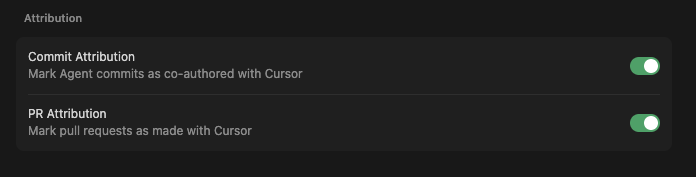
When enabled, Cursor will append Generated with Cursor or Co-authored-by: Cursor <cursoragent@cursor.com> to its commits, allowing our engine to detect it accurately.
Claude Code
Claude Code is Anthropic's command-line interface for coding. It includes attribution by default.
But if you want to be sure, add the attribution to your settings file:
Location: ~/.claude/settings.json or .claude/settings.json
{
  "attribution": {
    "commits": true,
    "pullRequests": true
  }
}Options:
- commits: Include Co-Authored-By in commit messages (default: true)
- pullRequests: Include Claude Code footer in PR descriptions (default: true)
How it works
Every commit created by Claude Code includes a marker in the commit message:
Co-Authored-By: Claude <noreply@anthropic.com>
Pull-requests will include Generated with [Claude Code](https://claude.com/claude-code) at the end of the description.
GitHub Copilot
GitHub Copilot is integrated into many IDEs. Depending on how you use it, attribution may vary.
Copilot Extensions & Agents
If you use Copilot via a specialized extension or agent (like Copilot SWE Agent), it often includes a Co-authored-by: GitHub Copilot trailer. These are detected automatically.
Manual Attribution
If your tool of choice doesn't support automatic attribution, or if you want to manually mark a specific commit as AI-assisted, you can use any of the following markers in your commit message:
1. Co-authored-by Trailer (Recommended)
Add this line at the bottom of your commit message:
Co-authored-by: AI <ai@example.com>
Our engine specifically looks for Co-authored-by trailers containing "AI", "Claude", "Copilot", "Cursor", etc.
2. Commit Message Keywords
Include any of these phrases in your commit message:
AI-generatedGenerated by AI[AI]
Why Attribution Matters
Correct attribution ensures that your project's dashboard accurately reflects the balance between human craftsmanship and AI assistance. It helps maintain transparency in open-source contributions and provides a realistic view of how AI tools are being integrated into your workflow.
Rollout Note
Detection patterns improve over time, but updates apply when repositories are analyzed again.
If a repository was indexed before a detection update, run a new analysis to pick up the latest attribution improvements.
If you use a tool that isn't being detected, please open an issue or contribute a pattern to our open-source detection engine.